
We’ve all been trained to trust search engines. Need to download a PDF editor, an open-source video converter, or the latest AI companion desktop app? You type it into the search bar, click the very first link that pops up, and hit download.
But lately, that muscle memory has become one of the most dangerous habits on the internet.
Syndis has noticed a surge in malvertising (e. malicious advertising) in the last few months that has turned search engine results pages into a minefield. Cybercriminals are actively buying up the "Sponsored" ad slots at the very top of Google and Bing. They aren't trying to sell you a product, they are paying to trick you into downloading malware and infostealers.
Here is how this threat works, why it is scaling so rapidly, and how you can protect yourself and your organization.
How "Sponsored" Results Become Malicious
Historically, malware was delivered through sketchy email attachments or dark corners of the web. Today, hackers are leaning into convenience. They use Search Engine Optimization (SEO) poisoning and paid search ads to meet users exactly where they feel safest.
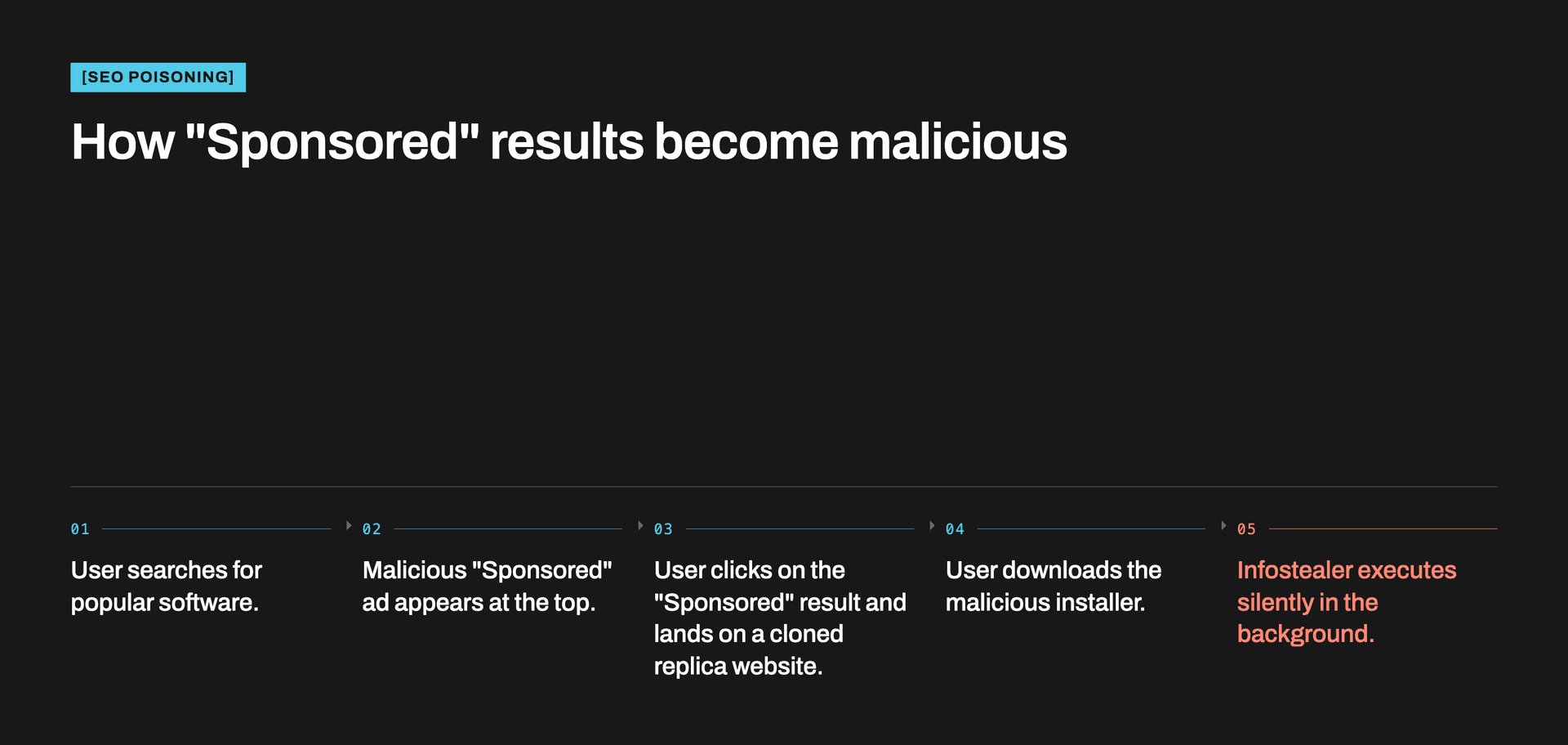
The process is alarmingly seamless:
- The Bait: A user searches for popular, legitimate productivity software (like ChatGPT desktop clients, WinSCP, Audacity, Blender, or Crystal PDF).
- The Hijack: The top result is a "Sponsored" link that looks identical to the real brand. Cybercriminals use sophisticated cloaking techniques to slip past Google and Bing's automated ad-vetting systems.
- The Clone: Clicking the ad takes the user to a perfectly mirrored website. The logos, the text, and the "Download Now" buttons look 100% genuine.
- The Payload: Instead of the utility tool, the user downloads a trojanized installer.
The Ultimate Goal: Infostealers and Token Theft
The malware being distributed through these fake ads isn't just standard adware that throws pop-ups on your screen. Security firms have tracked a massive wave of sophisticated Information Stealers (Infostealers), such as LummaC2, Atomic macOS Stealer (AMOS), and MacSync.
Unlike traditional viruses that aggressively disrupt your system, infostealers are designed to be quiet. They slip onto your machine, execute in seconds, and harvest highly specific, incredibly valuable data:
- Browser credentials: Saved usernames and passwords.
- Active session cookies: This is the most dangerous aspect. By stealing your active session tokens, hackers can bypass Multi-Factor Authentication (MFA). They don't need your password or your phone's authentication code. They simply copy your active login state and walk right into your corporate Slack, AWS, or banking portals.
- Cryptocurrency wallets and developer keys: Giving attackers immediate access to financial funds and secure cloud architecture.
No One is Safe: The Cross-Platform Shift
If you think being a Mac user keeps you safe, think again. Cybercriminals have aggressively expanded their infrastructure. Tactics like "ClickFix", where a fake browser error prompts the user to copy-paste a malicious command directly into their Mac Terminal, specifically target macOS users seeking AI tools and productivity software.
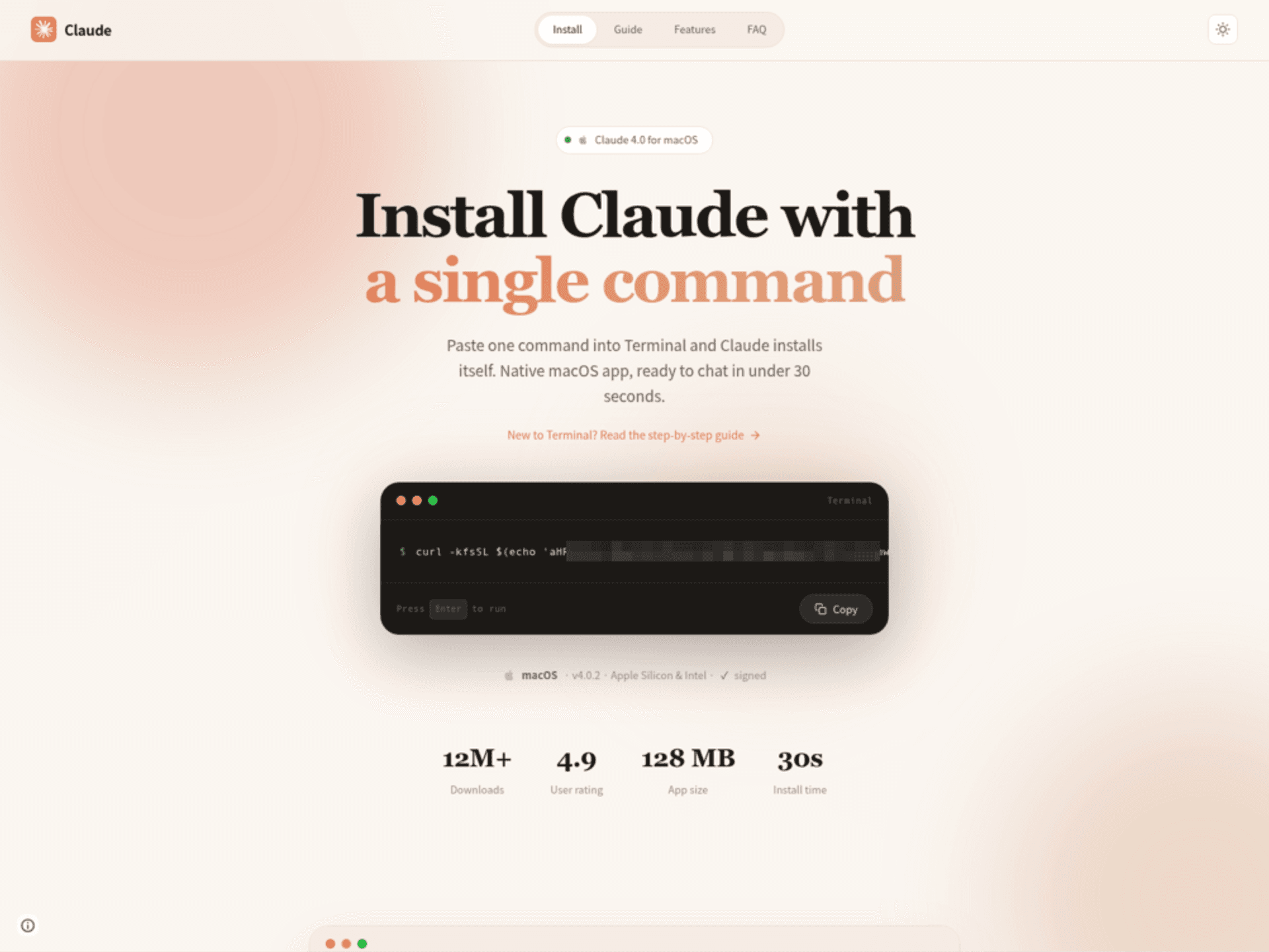
Image: An example of a ClickFix campaign claiming to install Claude. The terminal command is malicious and executes an infostealer.
Why is This Happening Now?
It boils down to the attacker’s Measure of Effort (MOE). Cybercriminals are moving away from complex, highly customized hacks in favor of high-throughput distribution.
Through Malvertising-as-a-Service, low-skill attackers can purchase pre-packaged infostealers, use Generative AI to quickly build flawless clone websites, buy stolen code-signing certificates to make their malicious files look trusted by Windows and Mac operating systems, and hijack the advertising pipeline. It is cheap, fast, and yields massive corporate and personal data hauls.
How to Protect Yourself and Your Organization
Because these links appear at the absolute top of reputable search engines, traditional "common sense" internet safety isn't enough. You have to actively break the habit of clicking the first thing you see.
- Skip the "Sponsored" section entirely: When searching for software, scroll past the ad block down to the organic search results. Verify that the URL matches the official, universally recognized domain of the vendor.
- Bookmark official repositories: If there are tools you download or update frequently, bookmark their official sites or use official application stores (like the Microsoft Store or Mac App Store).
- Use a reputable ad blocker: A robust browser-based ad blocker will prevent "Sponsored" search results from rendering in the first place, removing the temptation and the risk.
- Rethink browser password storage: Because infostealers specifically target browser profiles, storing highly sensitive credentials inside Chrome, Edge, or Safari carries a higher risk. Transition to a dedicated, encrypted password manager that requires secondary master authentication.
- Audit active sessions: If you or an employee accidentally downloads software from a questionable source, changing passwords isn't enough. You must explicitly choose to "Log out of all active sessions/devices" on critical accounts to invalidate any stolen session tokens.
- Implement security monitoring: Infostealers can easily bypass traditional antivirus software, making post-compromise monitoring essential. Deploy Endpoint Detection and Response (EDR) tools to flag anomalous browser behavior, and audit identity logs (like Entra ID or Google Workspace) for "impossible travel" alerts or stolen session tokens. Monitoring for and responding to these threats can be overwhelming, partnering with a managed service like Syndis’s SOC ensures 24/7 expert detection and rapid response to contain the threat before it can cause widespread damage.
The internet's front page has changed. The next time you look for a quick download, take an extra five seconds to look past the "Sponsored" label. That small pause could be the only thing keeping an infostealer off your network.