

Most of us can probably agree that organizations of all sizes and industries have these things in common: Stale service accounts, old API keys, and other non-human identities that are running in their environment. A lot of the time we don’t know what they’re used for, or even that they exist in general. These non-human identities are something that attackers rely on to escalate their privileges, hide from monitoring systems, and exfiltrate data from your environment.
You might be asking yourself what non-human identities are. We’re not talking about leprechauns, aliens or ghosts. Non-human identities are identities used by software, bots, and automated tasks and systems rather than real people. Just as employees use passwords to log in, programs and systems use automated credentials like API keys, service accounts, and OAuth tokens to talk to each other and share data behind the scenes. In short, they are the specialized access passes that let software and systems run seamlessly without a human actively typing at a keyboard.
Who hasn’t experienced going through their environment and finding a service account named “critical_svc_notouching” that they had no idea existed? You do some digging and find out that it was created in 2010 and has access rights all over the environment. Should you revoke the access rights immediately or should you just pretend you didn’t see anything and move on with your day?
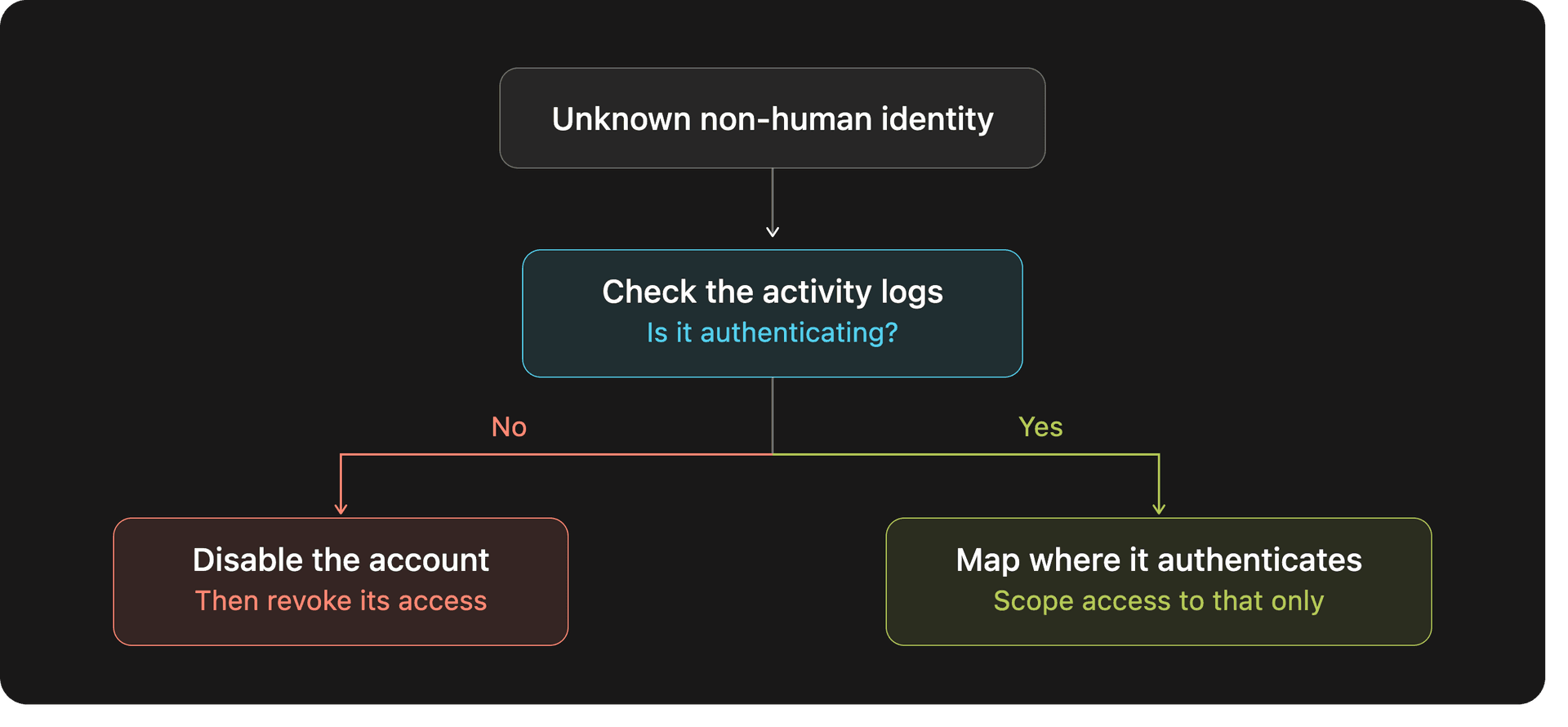
The right answer is neither! You should review the activity logs in your environment and check if that account is actually authenticating to anything or running any services in your environment.
If the answer is no: Disable the account. If nothing comes up after disabling it, write down the access that the account had and then start revoking that access.
If the answer is yes: Map out where the account is authenticating and what services it needs to run, and limit its access to that scope.
Why do attackers love non-human identities?
Why should you care about some old service accounts and API keys that are just sitting there? Often, these non-human identities possess administrative privileges, or access rights to sensitive locations and data. For example enterprise apps in Microsoft 365 that have over-privileged Graph API permissions, when they could have a more limited scope of permissions. Syndis’s incident response team regularly sees attackers adding enterprise apps or app registrations as backdoors to Microsoft 365 environments, it’s not enough to just reset the user’s password and revoke their sessions in those cases. Here are some examples of things that attackers can take advantage of:
- Harvesting forgotten secrets: Static credentials leak constantly in public code repositories, config files, and internal chat tools. Worse, when employees leave, they might leave behind files containing cleartext credentials or service accounts that they’d been meaning to change before they left.
- Exploiting over-privileged access: Developers routinely grant broad "Admin" rights to service accounts just to get features working fast. Obtain one over-privileged token, and an attacker inherits everything the token can reach.
- Living off the land: Attackers can compromise your non-human identities and use them to exploit pre-existing tools in your environment. If you’ve configured your security alerts, a human logging in from another country would trigger SOC alerts. An automated service account making an API call blends seamlessly into normal traffic, allowing attackers to move laterally and exfiltrate data undetected.
Imagine that you’re reviewing security logs for your environment and you see that “critical_svc_notouching” is running a process on one of your servers. If this is one of hundreds, or even thousands, of service accounts in your environment you might overlook it as regular activity. But in reality an attacker has compromised the service account and is running malicious commands and processes with the account.
How can I defend my environment?
Traditional Identity & Access Management (IAM) was built for people, not software. MFA and biometrics rely on human interaction. Without dedicated governance for non-human identities, you may end up with a large amount of identities that are unmonitored and over-privileged. Syndis recommends that you implement the following steps to secure non-human identities in your environment:
- Implement security monitoring so you can know what is going on in your environment. This is beneficial not only for alerting when something comes up, but also for reviewing your logs to spot anomalies or stale account usage in your environment.
- Review your non-human identities now. If you find anything during the review that you’re not familiar with, it needs to be thoroughly checked and its access revoked if it’s not in use.
- Perform regular access reviews for administrative access in your organization. You should implement this step into your workflow so it becomes part of a routine. If you regularly review who/what has access to your environment you will reduce your attack surface.
- Use managed identities where possible. Using managed identities removes the need to manage passwords and secrets for your non-human identities. If you need specific credentials for your identities, those credentials should be stored in a secure vault or password manager.
- Scan your environment for secrets and API keys regularly. Implement code scanning on your repositories, and scan your SMB fileshares for cleartext credentials.
- Follow the principle of least privilege. Before deploying an application, scope out what access it really needs to be able to do its job properly. Don’t give the application admin privileges if its only requirement is to read data.
- Implement lifecycle management. Assign explicit human owners to every non-human identity and automatically purge orphan identities when projects end.
Lock down your non-human identities today! Because the only thing running unsupervised in your environment at 3 AM should be your automated backups, not an attacker.